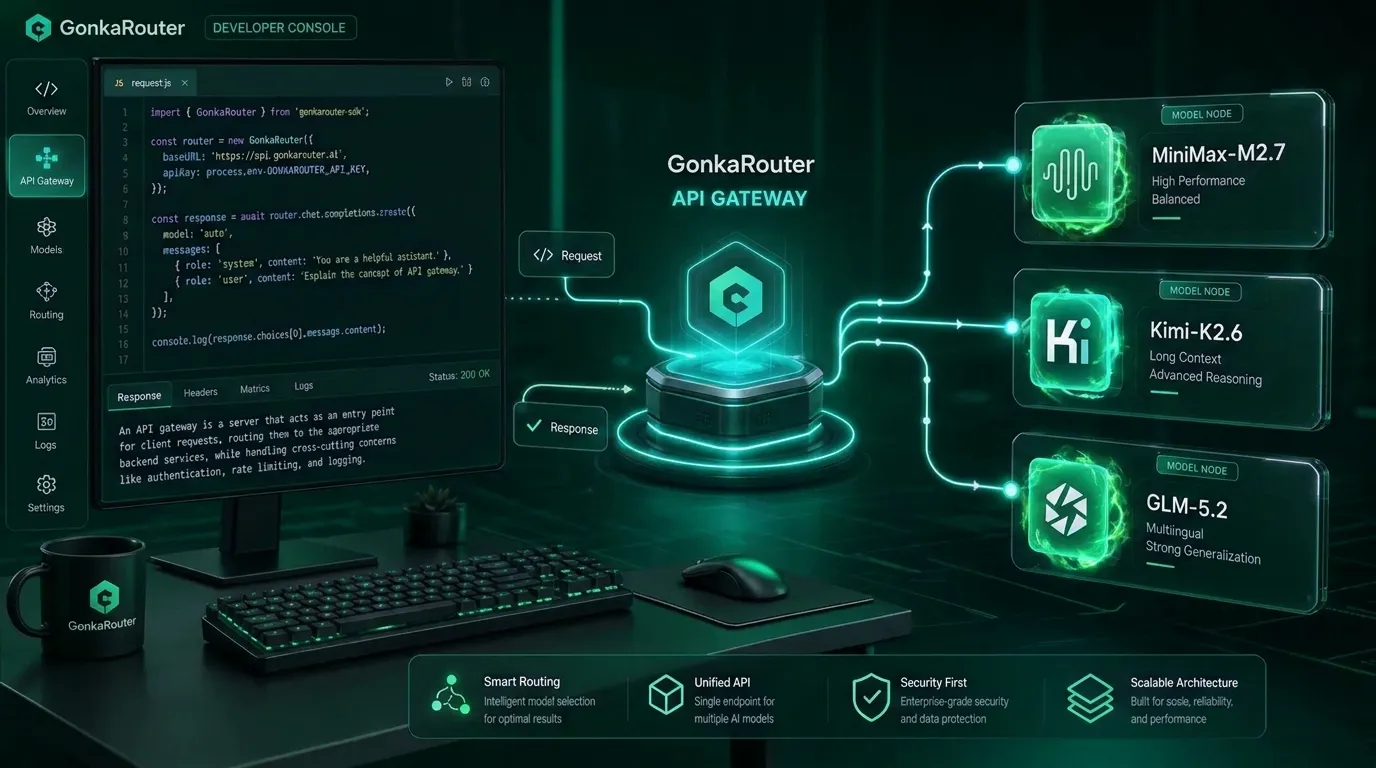
Developers use a multi provider LLM gateway to reduce integration work, centralize model access, and test supported AI models through one consistent API layer. GonkaRouter is built for that workflow: it is an OpenAI- and Anthropic-compatible AI Gateway / AI Model Router that currently provides unified access to MiniMax-M2.7, Kimi-K2.6, and GLM-5.2.
Why an AI model router API reduces multi provider LLM integration work
An AI model router API sits between your application and the models your product needs to call. Instead of building separate adapters, request formats, keys, and model-specific routing logic, your backend sends requests to a gateway layer. That gateway gives your team a single place to manage model access for supported models.
For developers building AI Agents, chatbots, content tools, code generation features, automated workflows, Q&A systems, or internal enterprise assistants, this matters because every model integration adds operational cost. A unified LLM API reduces that overhead by standardizing the connection point.
Microsoft describes model routing as a way to use a single deployment experience to optimize cost and latency across model choices in a managed environment. You can read the broader concept in Microsoft's routing concept documentation. GonkaRouter applies the same category logic in a focused way: one API for its currently supported models.
Developer problem | Gateway value | GonkaRouter fit |
|---|---|---|
Multiple model integrations | Centralize access behind one API | One API for MiniMax-M2.7, Kimi-K2.6, and GLM-5.2 |
Different request styles | Use familiar compatible formats | OpenAI-compatible and Anthropic-compatible API formats |
Slow testing cycles | Change endpoint or model selection faster | Endpoint-change integration |
Cost-sensitive prototyping | Track token usage during tests | Token pricing as low as $0.0004 / 1M tokens |
Onboarding friction | Start without complex registration steps | Email-based login and API key setup |
A practical AI gateway developer workflow starts with a simple goal: keep your application logic stable while making model access easier to change. GonkaRouter is not positioned as a marketplace or a universal catalog. It is a focused LLM routing platform for its currently supported models.
For broader context on GonkaRouter's unified model access positioning, you can also read this related GonkaRouter guide.
How the AI model router API works with compatible endpoint formats
GonkaRouter is designed to reduce integration friction by supporting OpenAI-compatible and Anthropic-compatible API formats. This means developers can use familiar request patterns where applicable, then point their application to the GonkaRouter endpoint and use a GonkaRouter API key.
Compatibility needs to be understood precisely. OpenAI-compatible and Anthropic-compatible refer to API format compatibility only. They do not mean GonkaRouter currently provides official OpenAI or Anthropic models.
For developers who already understand these API styles, the benefit is speed. OpenAI's Chat Completions pattern is documented in the OpenAI API reference. Anthropic's structured Messages API pattern is documented in the Anthropic API documentation. GonkaRouter supports compatible access patterns so teams can adapt existing backend workflows more quickly, while still using only GonkaRouter's supported model list.

The implementation principle is simple:
Log in with email.
Get an API key.
Review the GonkaRouter developer documentation.
Select MiniMax-M2.7, Kimi-K2.6, or GLM-5.2.
Replace the API Endpoint in your existing backend where applicable.
Run a smoke test.
Compare outputs, latency, and token usage before production use.
For teams already evaluating decentralized AI infrastructure, this GonkaRouter article on decentralized AI API access provides additional context around the Gonka ecosystem.
What this AI model router API supports today
GonkaRouter currently supports only three models: MiniMax-M2.7, Kimi-K2.6, and GLM-5.2. That scope is important. GonkaRouter should not be evaluated as an all-model catalog or as a general marketplace for every provider. It is a focused multi model API for developers who want unified access to the supported models through one gateway.
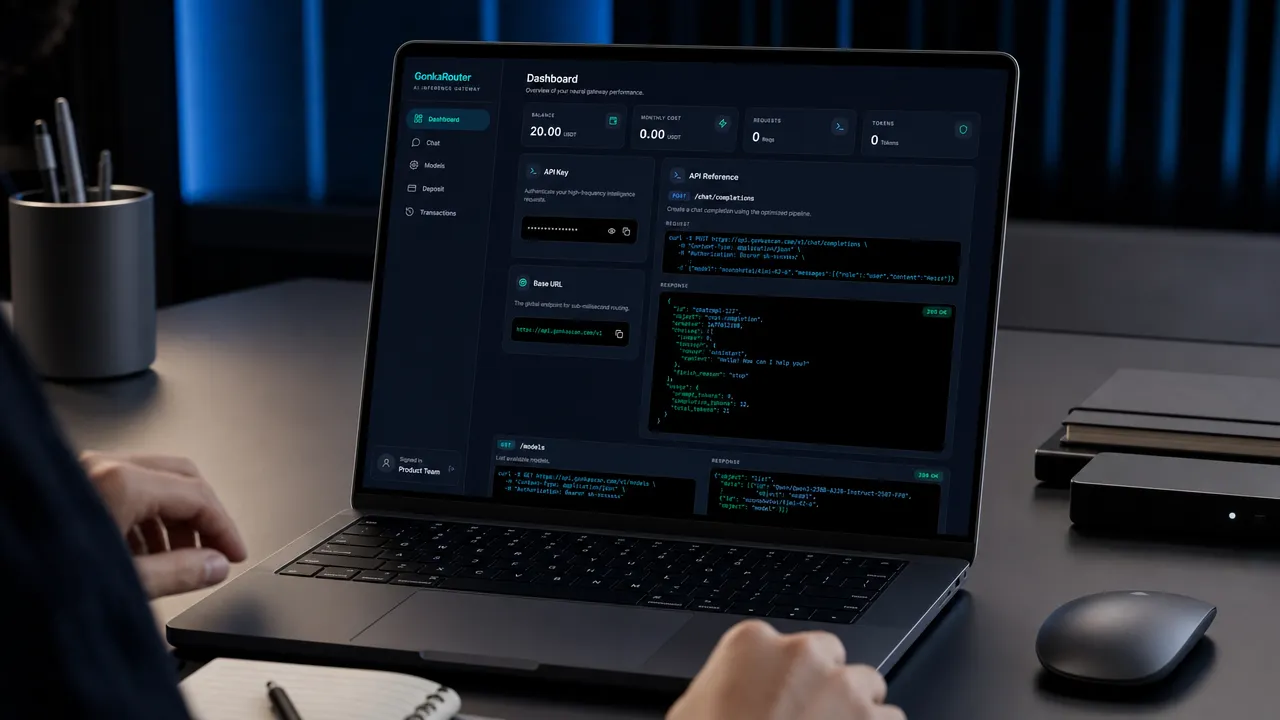
Supported model | Practical testing scenarios | What to evaluate |
|---|---|---|
MiniMax-M2.7 API | Chatbots, content generation, app prompts, workflow automation | Response style, structure, latency, and cost per task |
Kimi-K2.6 API | Agent workflows, document-style Q&A, structured prompts | Instruction following, context behavior, and step reliability |
GLM-5.2 API | Enterprise assistants, data analysis prompts, intelligent Q&A | Consistency, formatting, and performance on real business prompts |
A reliable model evaluation process should use the same prompt set across all supported models. That keeps your comparison fair and helps your team understand which model is best for each task.
Test type | Recommended measurement |
|---|---|
Basic chat | Relevance, tone, and response completeness |
Structured output | JSON or table formatting reliability |
Agent step | Planning quality and tool-output interpretation |
Code prompt | Correctness, formatting, and explanation clarity |
Long prompt | Instruction retention and context behavior |
Cost test | Tokens per completed task |
Latency test | User-facing response time |
Error handling | Retry behavior and fallback logic in your app |
GonkaRouter's cost positioning is also clear: token pricing is as low as $0.0004 / 1M tokens. Treat this as product usage pricing for API calls, and confirm live pricing in the product dashboard or documentation before production scaling. For cost-sensitive teams, this GonkaRouter cheap inference guide may be useful for related reading.
How to start using the AI model router API with GonkaRouter
The fastest way to start is to create an account, claim your API access, and test one supported model with a small prompt. GonkaRouter uses email-based login, which lowers the registration barrier for global developers, startup teams, Agent developers, Web3 project teams, and enterprise technical teams.
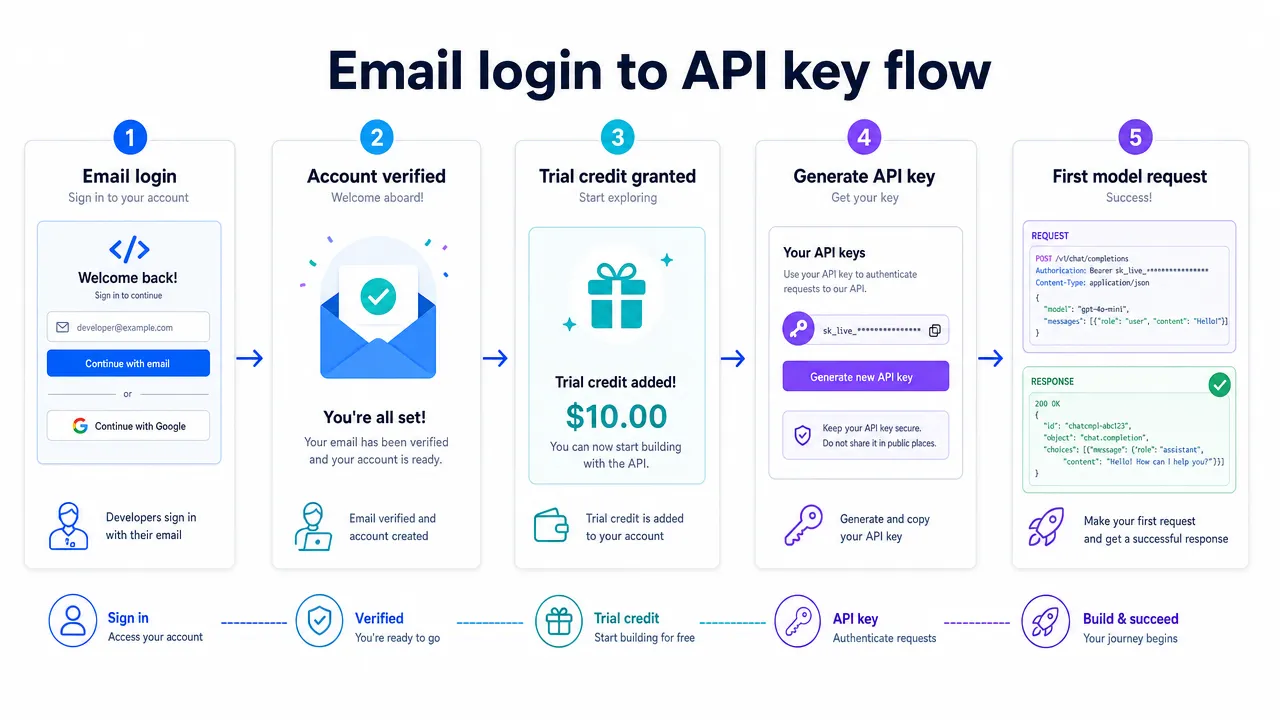
A practical setup flow looks like this:
Step | Action | Why it matters |
|---|---|---|
1 | Visit GonkaRouter | Start from the product entry point |
2 | Log in with email | Reduce onboarding friction |
3 | Receive the one-time 20 USDT trial credit | Use it as product usage credit for testing API calls |
4 | Get your API key | Authenticate requests from your backend |
5 | Read the developer docs | Confirm current parameters and integration details |
6 | Choose MiniMax-M2.7, Kimi-K2.6, or GLM-5.2 | Stay within the supported model scope |
7 | Change the API Endpoint | Minimize code changes where compatible |
8 | Run a smoke test | Verify connectivity before deeper evaluation |
9 | Test real workflows | Measure output quality, latency, and token usage |
The 20 USDT trial credit should be described only as product usage credit. It is intended for testing API calls and evaluating supported models after email login.
For production preparation, follow standard API security practices. Store keys in environment variables or a secrets manager, avoid exposing keys in frontend code, log model names and latency, track token usage by prompt category, and implement retries with backoff for transient errors. Before sending sensitive production data, review current GonkaRouter documentation and applicable data-handling policies.
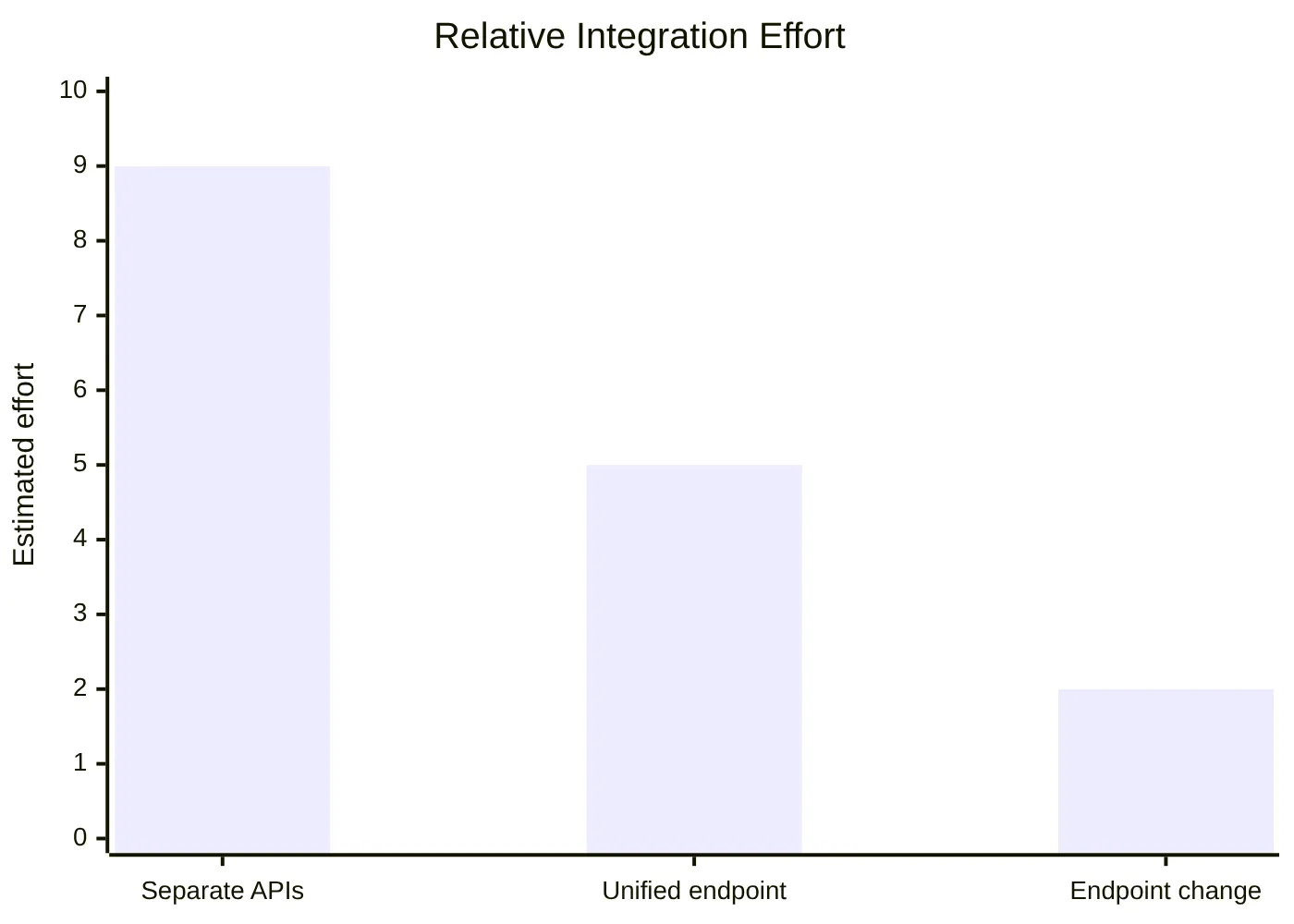
This chart is a qualitative illustration, not a benchmark. It shows the main reason developers adopt a unified AI endpoint: less integration plumbing means faster testing and lower maintenance work.
Where the AI model router API fits in real application workflows
GonkaRouter can support a range of developer workflows because many AI products need more than one type of inference task. An Agent may need planning, summarization, and structured output. A chatbot may need fast conversational replies. A content application may need consistent tone and formatting. An enterprise assistant may need stable Q&A behavior on internal prompt templates.
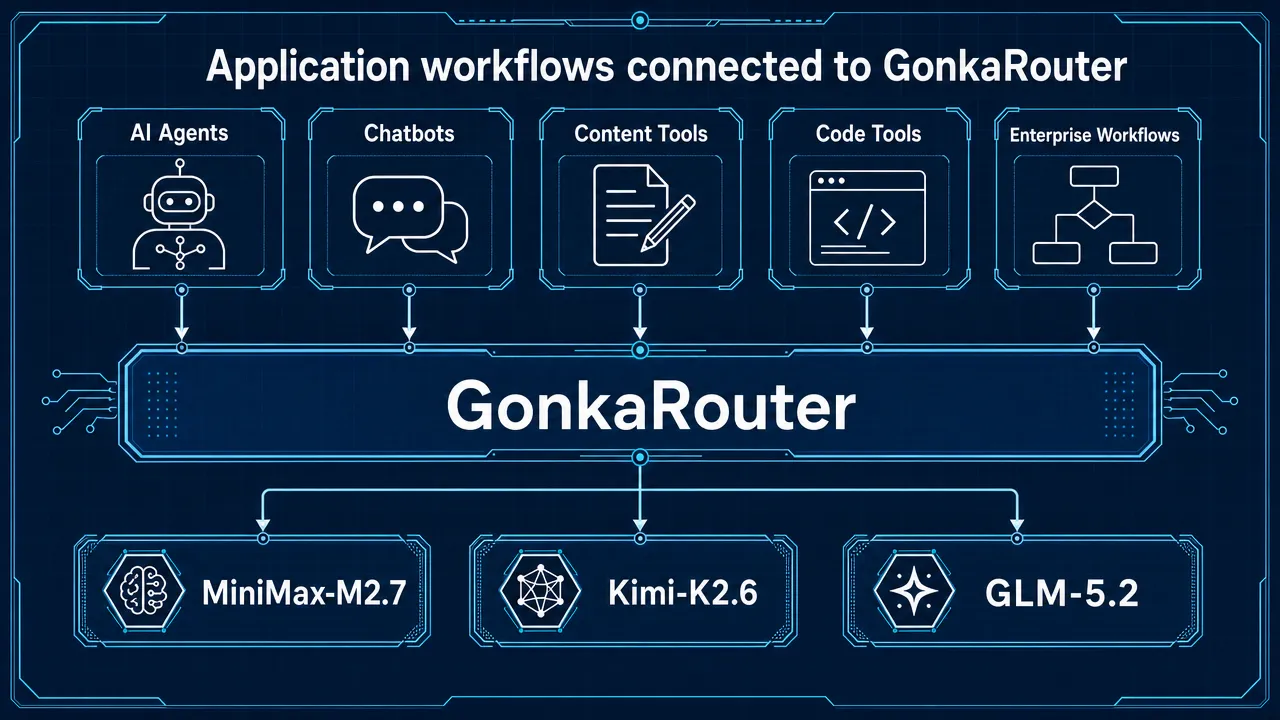
Use case | How GonkaRouter helps |
|---|---|
AI Agents | Provides a consistent Agent API layer for repeated model calls |
Chatbots | Lets teams test supported models for response quality and latency |
Content generation | Helps compare tone, structure, and cost per output |
Code generation | Supports evaluation of formatting, reasoning, and correctness |
Automated workflows | Standardizes backend inference calls |
Intelligent Q&A | Makes it easier to compare prompt behavior across supported models |
Data analysis prompts | Helps teams test structured reasoning and answer consistency |
Enterprise AI applications | Reduces provider-specific integration maintenance |
Compared with broad AI gateway products, GonkaRouter is more focused. That can be an advantage when your team wants a direct path to test MiniMax-M2.7, Kimi-K2.6, and GLM-5.2 without building multiple integrations. It is also important to be transparent: teams that require very large model catalogs should evaluate whether GonkaRouter's current supported model set fits their roadmap.
The best adoption pattern is task-based evaluation. Do not assume one model should handle every workflow. Instead, run a repeatable test set:
Define the task category.
Write 10 to 20 representative prompts.
Run the same prompts across MiniMax-M2.7, Kimi-K2.6, and GLM-5.2.
Score outputs for quality, structure, latency, and token usage.
Select the best supported model for each workflow.
Move the winning configuration into your application backend.
For teams building on top of the Gonka ecosystem, GonkaRouter is the developer entry point to low-cost AI inference access through the Gonka decentralized AI compute network. Gonka connects globally distributed GPU resources to support open and cost-efficient inference services for developers. GonkaRouter turns that infrastructure into a practical AI API gateway experience.
AI model router API FAQs for developers
What is an AI model router API?
An AI model router API is a gateway layer that lets an application call supported AI models through a centralized API instead of maintaining separate integrations for each model path.
What is a unified LLM API?
A unified LLM API gives developers one consistent interface for model calls. With GonkaRouter, this means one API for the currently supported models: MiniMax-M2.7, Kimi-K2.6, and GLM-5.2.
Is GonkaRouter OpenAI-compatible?
Yes. GonkaRouter supports OpenAI-compatible API formats. This refers to request and response format compatibility only.
Does OpenAI-compatible mean GonkaRouter provides official OpenAI models?
No. GonkaRouter does not currently provide official OpenAI models. It currently supports only MiniMax-M2.7, Kimi-K2.6, and GLM-5.2.
Is GonkaRouter Anthropic-compatible?
Yes. GonkaRouter supports Anthropic-compatible API access. This refers to API format compatibility only.
Does Anthropic-compatible mean GonkaRouter provides official Anthropic models?
No. GonkaRouter does not currently provide official Anthropic models.
How much does GonkaRouter cost?
Token pricing is as low as $0.0004 / 1M tokens. Check the live product dashboard or documentation before production usage.
What is the 20 USDT trial credit?
New users receive a one-time 20 USDT trial credit after logging in with email. It is product usage credit for testing API calls and supported models.
Can I use GonkaRouter for AI Agents?
Yes. GonkaRouter can be used as an Agent API layer for supported models, especially when your agent workflow needs repeated calls, structured prompts, or model comparison.
How do I start building?
Log in with email, get your API key, read the GonkaRouter developer documentation, choose MiniMax-M2.7, Kimi-K2.6, or GLM-5.2, change the API Endpoint, and run your first test request.